How to Create a Social Media Content Strategy for a Small Business
Strategy vs. just posting
| Just posting | Having a strategy |
|---|---|
| Post when there is time | Post on a planned rhythm |
| Whatever comes to mind | Topics chosen from pillars tied to goals |
| Same caption on every channel | Each channel gets an adapted version |
| Likes as the only measure | Results checked against the goal |
| Starts over every week | Repeatable workflow that improves each month |
Part 1: the decisions
- 1
Define your business goals
Pick one or two goals social media should support, such as bookings, enquiries, repeat purchases or local awareness. Write them so you can tell later whether they happened. - 2
Understand your audience
Describe who you want to reach, what they struggle with and what they ask before buying. Use real conversations, reviews and emails. - 3
Choose the right platforms
Go where your audience already is and where you can keep up. Two well-run channels beat five neglected ones. If you do run several, see managing social media across multiple platforms. - 4
Define content pillars
Turn audience problems into three or four recurring themes. Our tutorial on creating content pillars for social media shows the method step by step. - 5
Choose content formats
Match formats to platforms and to what you can produce: carousels and short video on Instagram, text and documents on LinkedIn, simple images and events on Facebook. - 6
Develop content ideas
Build a backlog of ideas per pillar. Start from content ideas organized by type.
Part 2: the repeatable workflow
Decisions only matter if they turn into posts. This is the routine that does it, usually run weekly or monthly.
- 1
Create a content calendar
Give every post a date, channel, pillar and status. Copy our social media content calendar template to get started, and plan a month at a time once you have a rhythm. - 2
Batch content creation
Write and design several posts in one session instead of one per day. Here is a practical batching workflow. - 3
Adapt content for each platform
Keep the idea, change the hook, length and format per channel. See how to repurpose content across social media. - 4
Review and approve content
Decide who signs off and by when. A clear content approval workflow avoids last-minute delays. - 5
Schedule and publish
Queue approved posts for their planned times. Our scheduling tutorial covers a simple routine. - 6
Measure results
Once a month, compare posts against your goal, not just likes. Look at which pillars, formats and channels did best. - 7
Improve the strategy
Each quarter, adjust pillars, formats and channels based on what you learned. Drop what doesn't work, do more of what does.
Example: a one-page strategy for a local physiotherapy clinic
| Decision | Answer |
|---|---|
| Goal | Fill weekday appointment slots and grow repeat visits |
| Audience | Active adults aged 30–60 with recurring pain, local area |
| Platforms | Instagram and Facebook; LinkedIn for corporate wellness deals |
| Pillars | Exercise tips, meet the team, patient stories, booking offers |
| Formats | Short exercise videos, carousels, team photos |
| Rhythm | 3 posts per week, batched every Monday |
| Approval | Clinic owner approves patient stories |
| Measure | Booking clicks and enquiries per month, reviewed monthly |
One page like this is enough for most small businesses. Revisit it every quarter.
Common strategy mistakes
- No goal. Without one you can't tell if anything is working.
- Too many channels. Quality drops everywhere when the team can't keep up.
- Strategy without a routine. A strategy document that doesn't change what you post each week isn't doing anything.
- Measuring only likes. Engagement matters, but check it against bookings, enquiries or sales.
- Never updating. Your first strategy is a hypothesis. Improve it with what you learn.
Strategy checklist
- One or two measurable business goals
- Audience described with real problems and questions
- Two to three platforms you can maintain
- Three or four content pillars
- Formats chosen per platform
- Ideas backlog per pillar
- Content calendar with statuses
- Weekly or monthly batching session
- Approval owner and deadline
- Monthly results review and quarterly strategy update
How Wemify can help
Wemify is built around the workflow part of the strategy: plan campaigns, create drafts, adapt them per channel, get approvals, schedule and publish, then see results. Campaigns keep goal-related posts together, and the calendar shows your rhythm.
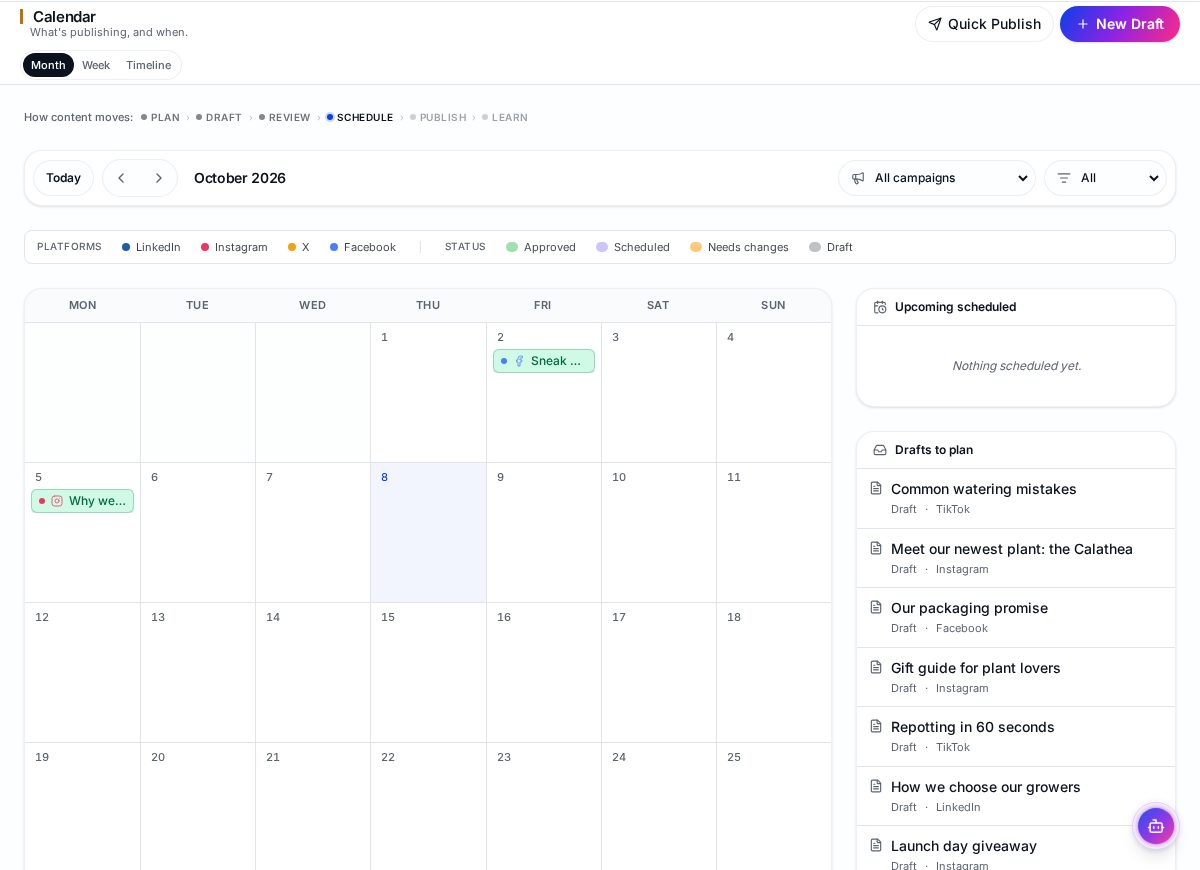
See the Wemify product overview for the full workflow, or compare options in the best social media management tools.
Frequently asked questions
What is a social media content strategy?
It is a plan for why you post, for whom, on which platforms, about which themes and in which formats, plus a routine for creating, approving, publishing and reviewing posts.
How do I create a social media strategy for a small business?
Start with one or two business goals, describe your audience, pick two or three platforms, define content pillars and formats, then set up a calendar and a weekly or monthly workflow.
How often should a small business post?
Choose a rhythm you can keep. A few good posts per week on one or two channels is usually better than daily posts that drop off after a month.
How often should I review my strategy?
Review results monthly and update the strategy itself roughly every quarter.
Run your strategy as a workflow
Plan, create, adapt, approve, schedule and measure in one Wemify workspace.
Continue reading
How to Create Content Pillars for Social Media
A practical method for choosing social media content pillars from your business goals, with examples for three industries and how to turn pillars into posts.
ReadSocial Media Content Calendar Template for Small Businesses
A free-to-copy social media content calendar template with the fields small teams actually need, an example month, and how to keep the calendar up to date.
ReadMarketing Workflow for Small Businesses
How to organize marketing without a marketing ops team: one plan, one workspace, clear owners and a weekly rhythm that survives busy weeks.
Read