How to Repurpose Content Across Social Media (Without Copy-Pasting)
Why repurposing beats starting from scratch
Most small teams don't run out of ideas. They run out of time to turn each idea into finished posts. A repurposing habit flips the work: you spend your effort on one well-researched core piece, then spend minutes, not hours, adapting it.
It also keeps your message consistent. When every post traces back to the same source, your audience hears one clear story across channels instead of five loosely related ones.
Repurposing is not the same as cross-posting. Cross-posting copies the same text and image everywhere. Repurposing keeps the idea and changes the format, length, hook and tone to suit each platform.
Choose content that is worth repurposing
Not everything deserves a second life. Good candidates usually share three traits:
- It answers a real question. A how-to, a common mistake, or a customer question you hear often.
- It contains several smaller points. A list of five tips can become five posts, a carousel and a short video.
- It has already done well somewhere. A post that got saves or comments is proof the idea resonates.
Check your results first. If one channel already shows which topics people engage with, start there rather than guessing.
Step by step: from one piece to many
- 1
Write down the core message in one sentence
Before you touch a caption, write the single idea the original piece makes. For example: "Most houseplants die from overwatering, not neglect." Every adaptation must keep this sentence true. - 2
Pull out the supporting pieces
List the facts, tips, quotes, numbers and visuals inside the original. Each becomes raw material: a quote for X, a tip list for an Instagram carousel, a short story for LinkedIn. - 3
Decide which channels fit the idea
Not every idea suits every channel. A behind-the-scenes photo may work on Instagram and Facebook but feel thin on LinkedIn. Pick two to four channels where the idea genuinely belongs. - 4
Adapt the format, hook and length per channel
Rewrite the opening line for each audience, adjust the length, and choose the right format (carousel, single image, text post, short video). Use the table below as a starting point. - 5
Adjust the call to action
Ask for what each platform does well: saves on Instagram, comments on LinkedIn, shares on Facebook, replies on X. One generic "link in bio" for every channel wastes the post. - 6
Review every version side by side
Read all versions together. They should sound like the same brand, make the same point, and not contradict each other on prices, dates or claims. - 7
Schedule them across days, not all at once
Spread the versions out so followers who use several platforms don't see the same idea five times in an hour. A few days between channels is usually enough.
How to adapt one idea for each platform
Platform conventions change, so treat this as a working guide rather than fixed rules:
| Platform | What tends to work | How to adapt the idea |
|---|---|---|
| Text-led posts, a clear point of view, lessons from experience | Open with the insight or a short story, explain why it matters professionally, end with a question. | |
| Strong visuals, carousels, short captions, saves | Turn tips into carousel slides, keep the caption brief, make the first slide the hook. | |
| Community tone, local or practical posts, shares | Write conversationally, add a practical detail, invite people to share their own experience. | |
| X | Short, direct statements and threads | Lead with the sharpest sentence; split a list into a short thread if needed. |
Example: one blog post, four posts
Original: a blog post titled "Five watering mistakes that kill houseplants".
- LinkedIn: "We replaced more plants last year because of overwatering than anything else. Here's what we now tell every customer..." followed by the three most surprising mistakes.
- Instagram: a five-slide carousel, one mistake per slide, caption: "Save this before your next watering day."
- Facebook: "Which of these have you done? (We've done all five.)" with a single photo and the list.
- X: "Most houseplants don't die from neglect. They drown." plus a short thread of the five mistakes.
Common repurposing mistakes
- Pasting the same caption everywhere. Hashtags, mentions and links behave differently per platform, and audiences notice.
- Cropping instead of redesigning visuals. A landscape image squeezed into a vertical format loses its point.
- Losing the core message. If an adaptation drifts into a different claim, it stops being repurposing and becomes a new, unreviewed post.
- Publishing all versions at the same time. It looks automated and gives followers no reason to check other channels.
- Skipping review. Small changes to tone or numbers are easy to miss when you write four versions quickly.
A quick repurposing checklist
- The core message is written in one sentence.
- Each channel version has its own opening line.
- Format fits the channel (carousel, image, text, video).
- The call to action matches what the platform does well.
- Facts, prices and dates match across all versions.
- Versions are spread across different days.
How Wemify can help
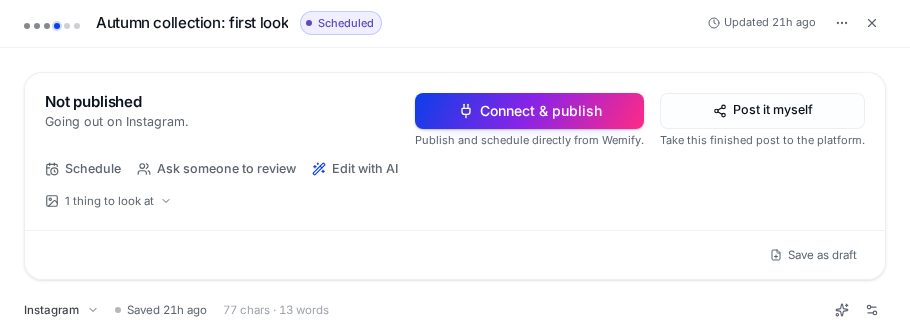
In Wemify, each post is a draft you can pick a channel for and adapt. When you change the channel, the draft can be rewritten for that platform using your brand details, so you keep the idea and adjust the length and tone. You still read and edit every version before it goes out.
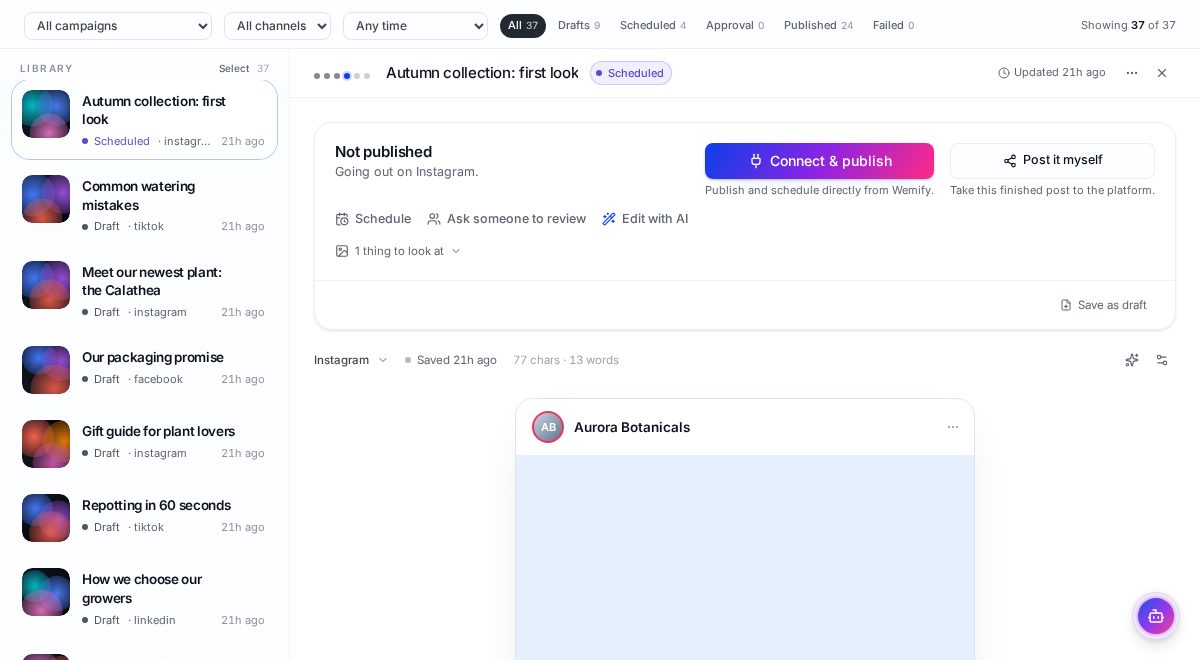
All versions live in the same Posts library, so you can see which channel versions exist, which are still drafts and which are scheduled. If you want help rewriting for tone and length specifically, AI content optimization explains how that part works.
Repurposing is one stage of a larger process. The social media content workflow guide shows where it fits between creating and scheduling.
Frequently asked questions
What is content repurposing?
Content repurposing is taking one original piece, such as a blog post, video or customer story, and reshaping its core idea into new formats for other channels, rather than copying the same text everywhere.
How many times can I repurpose one piece of content?
As many times as it stays useful. A detailed piece with several points can usually become multiple posts per channel. Stop when the versions start repeating rather than adding a new angle.
Is repurposing the same as cross-posting?
No. Cross-posting publishes identical content on several platforms. Repurposing keeps the message but changes the format, length, hook and call to action for each platform.
Should I post repurposed content on the same day?
Usually it works better spread over a few days, so people who follow you on several platforms get a new angle each time instead of the same post repeated.
Adapt one post for every channel
Write it once, adapt it per platform, and review every version in one place.
Continue reading
How to Repurpose Content in Wemify
Turn one post into versions for Instagram, LinkedIn, Facebook and more inside Wemify, using Create for and Rewrite for other channels.
ReadHow to Build a Social Media Content Workflow
A practical social media content workflow: plan by campaign, write once, adapt per channel, approve, schedule, and use results to plan the next week.
ReadHow to Build a Better Content Creation Workflow
Fix the slow part of content production: batching, briefs, reusable formats, one media source of truth, and where AI genuinely saves time.
Read