How to Create Content Pillars for Social Media (With Examples)
What content pillars do in practice
A pillar is a theme you return to on purpose, such as 'how-to tips', 'behind the scenes' or 'customer results'. It is not a single post or a campaign. Campaigns come and go; pillars stay.
- Faster planning. Instead of a blank calendar, you fill slots per pillar.
- A clearer brand. People learn what to expect from you.
- Better balance. Pillars make it obvious when you post too much promotion.
- Easier review. You can compare results per pillar, not just per post.
How many pillars should a small business have?
Three or four is enough for most small businesses. Fewer than three gets repetitive. More than five gets hard to cover consistently when you post a few times a week. If you post twice a week, three pillars is plenty.
From business goal to posts: the method
Good pillars come from a chain: business goal, audience problem, pillar, ideas, posts, calendar. Work through it in order.
- 1
Write down one or two business goals
Concrete ones: more consultation bookings, more repeat customers, more inbound enquiries from companies. - 2
List the audience problems behind each goal
What does your audience struggle with, worry about or ask before they buy? Use real customer questions, not guesses. - 3
Group problems into themes
Problems that belong together become a pillar. 'I don't know which product fits me' and 'I'm scared of buying the wrong size' might become a 'help me choose' pillar. - 4
Add one human pillar
Behind the scenes, team or values. People follow people, and this pillar is often the easiest to fill. - 5
Test each pillar for 10 ideas
If you can't list ten post ideas for a pillar, it is too narrow. Our social media content ideas for small businesses can help fill the list. - 6
Decide the mix
For example 40% education, 25% behind the scenes, 20% customers, 15% offers. A rough split is enough. - 7
Place pillars on the calendar
Give each upcoming slot a pillar before you pick topics. That is how pillars turn into a monthly content plan.
Worked example: from goal to calendar
| Step | Example: independent accountant |
|---|---|
| Business goal | Five new small-business clients this quarter |
| Audience problem | Owners don't know what they can deduct and fear deadlines |
| Pillar | Money tips for small business owners |
| Content ideas | Deadline reminders, 'can I deduct this?' series, common bookkeeping mistakes |
| Social posts | Carousel: five costs owners forget to deduct; LinkedIn text: what the next deadline means |
| Calendar | One post from this pillar every Tuesday |
Content pillar examples by industry
Café or bakery
- Made here: baking process, new recipes, sourcing
- Visit us: opening hours, events, seasonal menu
- Regulars: customer photos, staff favourites
- Offers: pre-orders and holiday specials
B2B consultant or small agency
- Expertise: frameworks, mistakes you see, your opinion on trends
- Proof: client results and short case studies
- How we work: process, tools, team
- Offers: workshops, audits, availability
Online shop
- Help me choose: sizing, comparisons, styling
- Product stories: materials, makers, launches
- Community: reviews and customer photos
- Offers: drops, bundles and restocks
Common pillar mistakes
- Pillars that describe you, not your audience. 'Our services' is a category, not a reason to follow.
- Too many pillars. Five pillars at two posts a week means each appears less than twice a month.
- Never revisiting them. Review pillars each quarter; drop the one that never performs.
- Treating pillars as rigid. A good post that doesn't fit any pillar can still go out.
How Wemify can help
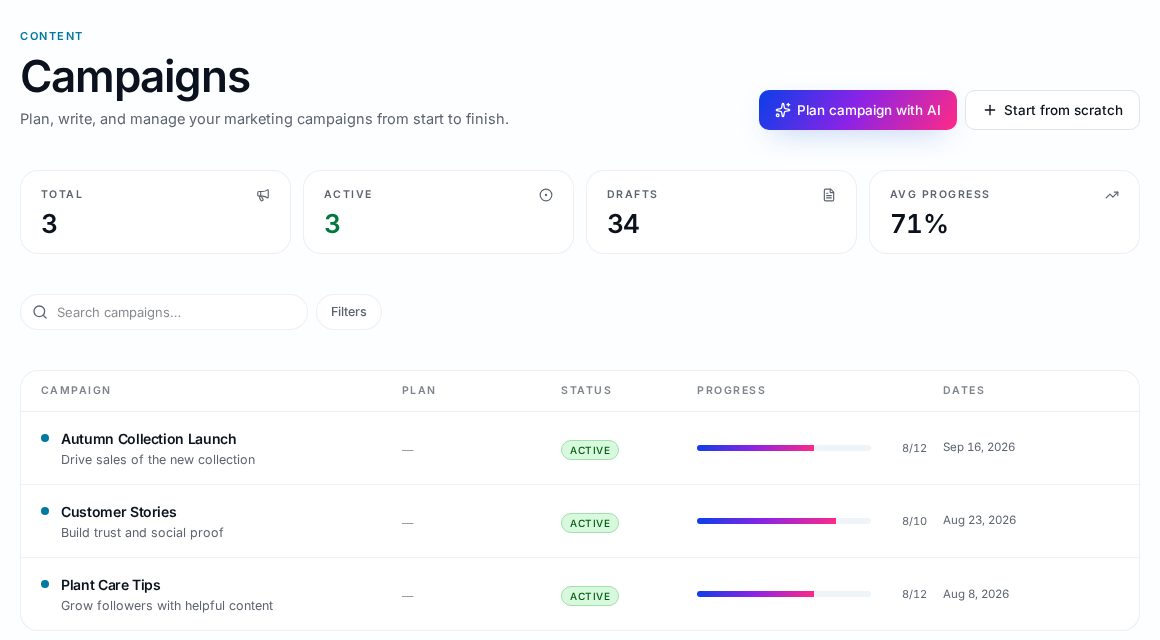
In Wemify you can use campaigns to group posts for a theme or launch and see each campaign's progress, and the Posts library lets you filter by campaign, channel and status. That makes it easy to check whether each part of your plan is actually getting posts.
Pillars are one part of a wider plan. Read how to build a social media content strategy for a small business for how they connect to goals, platforms and measuring results, or see the content workflow software page.
Frequently asked questions
What are content pillars on social media?
Content pillars are three to five recurring themes that most of your posts belong to. They guide what you post and keep your content balanced.
How many content pillars should I have?
Three or four works for most small businesses. Fewer becomes repetitive; more becomes hard to cover consistently.
What is the difference between a content pillar and a campaign?
A pillar is ongoing. A campaign is time-bound, such as a launch or seasonal push. Campaign posts usually still fit one of your pillars.
Should every post fit a content pillar?
Most should, but not all. Leave room for timely or one-off posts that are worth sharing.
Plan every pillar in one place
Group posts, track progress and keep your mix balanced in Wemify.
Continue reading
Social Media Content Ideas for Small Businesses
Practical social media post ideas for small businesses, grouped into ten content types with examples, when to use each, and how to turn ideas into a posting plan.
ReadHow to Plan a Month of Social Media Content
A ten-step process for planning a full month of social media posts: goals, content pillars, ideas, platforms, calendar, creation, approvals, scheduling and review.
ReadSocial Media Content Strategy for Small Businesses
Build a small business social media content strategy in 13 practical steps, from goals and platforms to pillars, calendar, batching, approvals and measuring results.
Read